IMPORTANT
- Always use the TV remote that came with your TV. Your cable operator has no interest in supporting any content except cable TV.
- If you have never updated the software on your TV, update it now.
- Believe it or not, it may help to "re-boot" your TV. Just like a computer, TV software sometimes needs to be restarted. The only way to re-start a TV is to unplug it, wait a few moments, and plug it in again. Turning the TV on does NOT re-start the TV because a TV is always partially on.
Here is the main support page for this TV:
https://www.sony.com/electronics/support/televisions-projectors-oled-tvs-android-/xr-55a90j/faqs
Supported USB file systems
According to Sony’s official A90J series specifications, the TV’s USB ports accept drives formatted in FAT32 and NTFS. FAT32 is the format for the standard BillionDollarArtGallery; NTFS is the format for more recent TVs that is used in the other popular version of the BillionDollarArtGallery.
USB Support Page
https://helpguide.sony.net/tv/iusltn1/v1/en-003/04-01_01.html
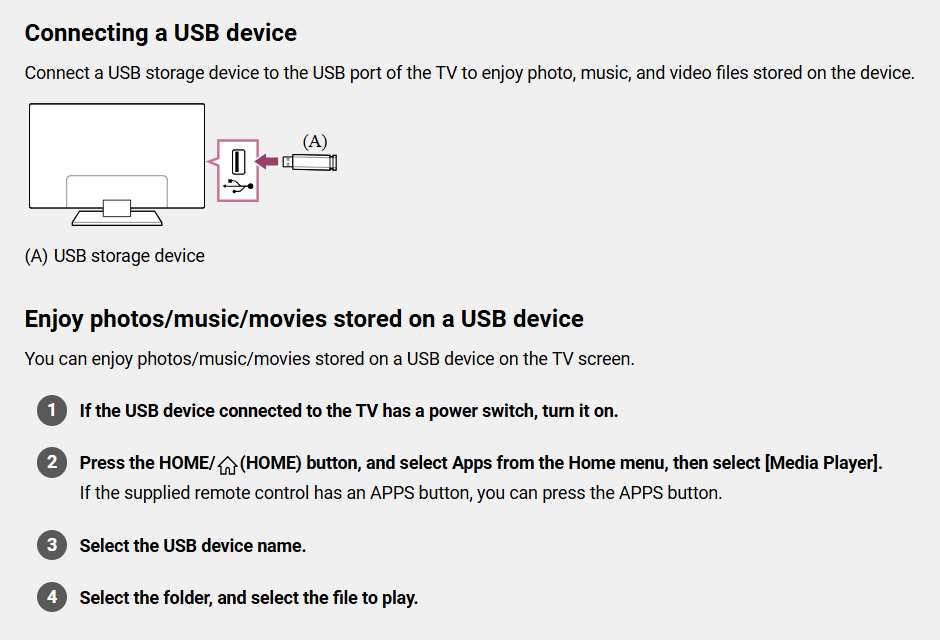
You do not need to install a separate video app to play most MP4 files from USB on the Sony XR‑55A90J. The TV has a built‑in media player accessible from the Home screen that can play compatible MP4 files directly from a USB drive.
If your videos are not playing, we recommend that you install the industry standard video app: VLC Media Player https://www.videolan.org/
Was this article helpful?
That’s Great!
Thank you for your feedback
Sorry! We couldn't be helpful
Thank you for your feedback
Feedback sent
We appreciate your effort and will try to fix the article